Spades - Classic Card Games
- 4.9
- Rating
- 1.00M
- Installs
- Free
- Price
 Analysis by App-foxy
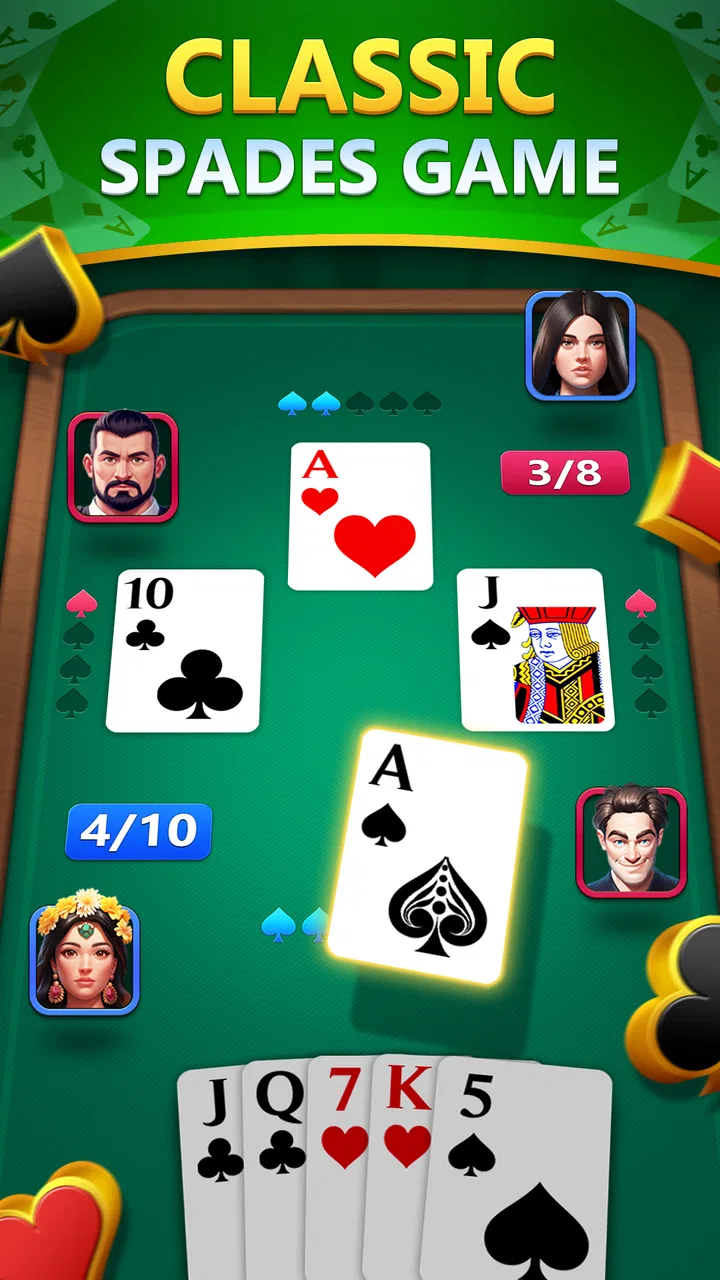
I spent time with Spades - Classic Card Games as a straightforward mobile card game, and my first impression is that it understands why people still return to Spades: the rules are familiar, the pace is easy to follow, and a short session can fit almost anywhere. Developed by Big Cake, it presents itself as a free game for Android users who want a traditional trick-taking experience without setting up a physical deck.
The appeal is not flashy complexity. This is a casual card title built around the core Spades loop, so the enjoyment comes from choosing bids, reading the table, managing the trump suit, and trying to coordinate with a partner. I found it most comfortable when I wanted something focused but not demanding, such as during a quiet break or while waiting for an appointment.
How the current version feels in everyday play
The current release is version 1.0.21, and the game was released on February 18, 2025. That makes it a relatively young entry in a category filled with long-established card apps. Even so, it feels aimed at players who do not need a large collection of modes to enjoy a few hands. The design is best understood as a compact Spades table rather than a broad card-game platform.
You May Also Like

 Blood Strike: 2.5 Anniversary
Blood Strike’s Loadouts Turn Every Drop Into a Tactical Gamble
A close look at Blood Strike’s custom loadouts: how fast access to signature weapons reshapes its battle royale rhythm, rewards preparation, and narrows the gap between fights.

 Pandora - Music & Podcasts
Pandora’s Music Is Easy to Start, but Harder to Recover
Pandora’s strength is its low-effort path from a seed to a station. Its weak spot is how much confidence it asks you to place in connection, setup, and quiet recovery.

 8 Ball Pool
 Is Built on Rivalries, Rematches, and Routine
A close look at the rivalries, rematches, shared routines, and unanswered safety questions that turn a quick pool match into a persistent mobile community.

 Samsung Music
’s Quiet Strength Is Playing What You Already Own
Its reach comes less from spectacle than from dependable access to a personal library. That simplicity is both the app’s strongest retention engine and its ceiling.

 AccuWeather: Weather Radar
AccuWeather Review: A Quick, Clear Forecast for Everyday Decisions
For everyday plans, the best forecast is the one you can understand quickly. AccuWeather makes rain timing, radar, and local conditions easy to act on, with a few trade-offs.

 Hill Climb Racing
Why Hill Climb Racing Still Turns Crashes Into One More Run
A tiny car, a bumpy hill and one more upgrade: Hill Climb Racing keeps resurfacing because its simple chaos makes every near-miss feel personal.
More From Our News Desk



That focus helps the opening experience. If you already know the basic rules, you can get into a hand quickly instead of learning a complicated interface first. If you are new to Spades, the central ideas are also easy to recognize: estimate how many tricks your side can take, remember that spades act as trump, and avoid promising more than your hand can realistically deliver.
I particularly like Spades as a game for short, repeatable sessions. A single hand can feel meaningful because every early decision affects the later tricks. A low card that looks useless at the start may become valuable after higher cards have been played, while an apparently strong hand can become awkward if the bid is too ambitious. That gives the game more strategic texture than a simple “play the highest card” card app.
The store presentation describes it as a relaxing classic experience with friends, and that is a fair way to frame the mood. The game is not trying to replace a full tabletop night. Instead, it gives me a convenient way to revisit a familiar pastime when I do not have cards, a table, or several people nearby.
The rules reward restraint more than dramatic moves
New players often focus on winning individual tricks, but the more important skill is judging the whole hand. I found that conservative bidding is usually a better starting habit than chasing every possible trick. A hand with several medium cards may look promising, yet it can collapse once opponents force out the useful spades or make me spend a high card earlier than planned.
One practical approach is to count likely winners separately from uncertain tricks. A guaranteed high spade is not the same as a side-suit ace, because the ace may be cut if another player is already void in that suit. Keeping that distinction in mind makes the game feel less random and gives beginners a useful way to improve without memorizing advanced terminology.
Another small but important habit is watching which suits opponents stop following. When a player cannot follow suit, that player may be able to use a spade on a later trick. I found this more useful than simply remembering every card, especially on a phone where the screen encourages quick decisions. The game works well as a light mental exercise because it rewards attention without requiring a long uninterrupted commitment.
Who will enjoy this version most
This is a good fit for someone who already likes classic card games and wants a free, accessible Spades option on a compatible Android device. It also suits people who prefer rules they can learn in minutes but decisions that continue to improve with practice. The Teen content rating makes it more appropriate for older children and adults than for very young players.
I can also see it working for a family member who knows the physical version but does not want a complicated online card platform. The basic format is recognizable, and the mobile setting removes the preparation involved in dealing cards. For a casual player, that convenience may matter more than a large feature list.
It is less suitable for anyone looking primarily for a social community, a tournament ladder, or a deep collection of alternate rule sets. Players who want constant competitive matchmaking should compare it with more specialized multiplayer card services. Likewise, people who dislike turn-based games may find the deliberate pace too slow, even though that pace is part of what makes Spades relaxing.
What the release and version tell me
The February 2025 launch and version 1.0.21 place this game in an early stage of its product life. I see that as both an advantage and a reason to keep expectations measured. A newer app can feel cleaner and less burdened by years of accumulated menus, but it may also still be developing the depth that veteran card players expect from a mature platform.
For an existing user, the current version is mainly important as a sign that the app is being presented as an active, current release rather than an abandoned archive. I would still judge it by the quality of the hands, the clarity of the interface, and how comfortable it is during repeated sessions. A version number alone does not make a card game better; what matters is whether the update path keeps the experience stable while improving the areas players actually notice.
My expectation is that future development will be most valuable if it protects the simplicity of the table while adding useful depth around it. Better onboarding, clearer explanations of scoring, and thoughtful options for different play preferences would help newcomers without distracting experienced players. I would rather see careful refinement than a pile of unrelated features that makes a classic card game feel busy.
How it compares with physical cards and other mobile choices
Compared with a physical deck, the obvious benefit is convenience. I do not need to shuffle, deal, or find three other people before starting. The trade-off is that a phone cannot reproduce the small social details of a real table: reading a friend’s reaction, discussing a questionable bid, or pausing to teach someone face to face. I would choose this app for a quick solo session, but I would still choose physical cards for a planned gathering.
Compared with broader card-game apps, this one benefits from having a clear identity. A platform packed with solitaire, poker, rummy, and collectible games may offer more variety, but it can also make Spades feel like one tile among many. Here, the narrower purpose is useful when I already know what I want to play.
The compromise is that a focused Spades game has less reason to keep me engaged if I am not specifically in the mood for Spades. Someone who alternates between several card traditions may get better value from an all-in-one app. I would not install this expecting a complete replacement for every card game on my phone.
Small decisions that improve the experience
My first tip is to treat the bidding phase as the main strategy, not as a formality before the “real” play begins. Before committing, I look for a realistic number of tricks and downgrade hands that depend on too many uncertain outcomes. This makes the game calmer and reduces the frustration of losing because of an overconfident opening estimate.
My second tip is to use early tricks to gather information rather than spending every strong card immediately. If I can safely follow suit, I pay attention to who appears short in that suit. That information can shape the later order of my plays and help me decide when a spade is worth using. It is a simple workflow, but it turns a casual hand into a more satisfying puzzle.
My third tip is to play in short focused blocks instead of treating every hand as background noise. Spades depends on memory and timing, so switching constantly between apps makes the decisions feel more arbitrary than they really are. A few attentive hands are more rewarding than many rushed ones, especially when learning how the opposing side responds.
A fourth trade-off is worth noting for families and shared devices. The game is free to start, but it includes in-app purchases ranging from $1.99 to $39.99 per item. I would review the purchase settings before handing the device to a younger player, particularly because the Teen rating does not mean every household will want unrestricted buying access. The free entry point is convenient, but the presence of optional spending should still be part of the decision.
Practical details before installing
The game is listed as free and requires Android 6.0 or later. That makes it accessible to a broad range of Android phones, including devices that are not running the newest operating system. I would still leave enough storage and keep the system reasonably updated, since a compatible minimum version only tells me whether the operating system can run the app, not how comfortable the experience will feel on every handset.
Its audience response is encouraging: the game has an average rating of 4.9 from around 9.1 thousand ratings, along with roughly 782 written reviews. It has also passed the 500-thousand-install mark. Those figures suggest that the app has attracted a meaningful audience, but I would interpret them alongside my own needs. A strong overall response is reassuring; it does not guarantee that a player seeking advanced competition or a particular house rule will find exactly what they want.
One question many readers will have is whether this is a good first Spades game. I think it can be, provided the player is willing to learn through practice rather than expecting the app to replace a full lesson. Beginners should start by bidding modestly, watching suit patterns, and accepting that some losses come from incomplete information rather than bad luck alone.
Another likely question is whether it is the right choice for playing with friends. The store summary emphasizes friends, but I would choose it mainly for its accessible card-game format and check the available social options directly on the device before planning a group session. If coordinated online play is the deciding factor, a service built specifically around live multiplayer may be a safer choice.
Players may also wonder whether the purchase range makes the game expensive. The initial download is free, while optional items can cost from $1.99 up to $39.99 each. I would treat the free version as the sensible starting point and only consider spending if the app already fits my routine. There is no reason to buy anything immediately just to discover whether the basic Spades experience suits me.
Where the game still has room to grow
The main limitation is not that it is a Spades game; it is that a focused classic card title must work hard to remain interesting after the novelty wears off. Repeated hands are enjoyable when the decisions feel meaningful, but players who need progression, competitive goals, or lots of customization may eventually want more structure.
I also think newcomers benefit from especially clear teaching tools in a game like this. Spades has rules that are easy to describe but surprisingly subtle in practice, particularly around bidding, trump usage, and partnership expectations. Any future refinement that explains those moments without interrupting experienced players would make the app more welcoming.
There is also a difference between relaxing play and serious analysis. The former needs an uncluttered table and a comfortable rhythm; the latter needs detailed feedback, dependable records, or deeper ways to study mistakes. This game’s strongest identity is the relaxed side. I would not select it as my first choice for formal training or high-level competitive preparation.
That distinction helps set fair expectations. The app does not need to become a huge card-game ecosystem to be worthwhile. It needs to make the central hand enjoyable, keep decisions understandable, and give returning players enough reason to sit down for one more round. If it does that consistently, its compact scope becomes a strength rather than a weakness.
My recommendation after playing it
Spades - Classic Card Games is an easy recommendation for Android users who specifically want a familiar Spades experience in a convenient mobile format. Big Cake has chosen a clear direction: keep the focus on a classic trick-taking game, make the entry point free, and avoid forcing the player to learn an oversized system before playing.
I would recommend it to casual card fans, people returning to Spades after a long break, and anyone who wants a thoughtful five-minute distraction rather than an action-heavy game. I would skip it if my priority were a large multiplayer community, extensive tournament features, or a single app containing every major card genre.
The current version gives the game a credible starting point, while its future value will depend on how well later development balances simplicity with useful improvements. For now, I see it as a pleasant, focused card table: not a replacement for playing with friends in person, and not the deepest Spades tool available, but a practical free option that makes the classic game easy to pick up whenever I have a little time.
FAQs for Spades - Classic Card Games
01What is Spades - Classic Card Games, and how does it work?
Spades - Classic Card Games is a digital version of the popular card game, Spades. It allows you to play against AI opponents or real players online. The game follows traditional Spades rules, where players are partnered and must strategically play spades to win tricks. It's perfect for both beginners and experienced players, offering various difficulty levels.
02Is Spades - Classic Card Games free to play?
Yes, Spades - Classic Card Games is free to download and play. However, it may include in-app purchases that can enhance your gaming experience. These purchases might include additional game themes, removal of ads, or special card decks. The app is designed to be enjoyable without any purchases, so spending is entirely optional.
03Can I play Spades - Classic Card Games offline?
Yes, Spades - Classic Card Games offers an offline mode where you can play against computer-generated opponents. This is great for practicing your skills or enjoying the game when you don’t have internet access. However, for multiplayer modes and leaderboards, an internet connection is required.
04How does the multiplayer feature work in Spades - Classic Card Games?
The multiplayer feature in Spades - Classic Card Games allows you to connect with friends or other players around the world. You can either join existing games or create your own private room to invite friends. The game includes a chat feature for communication, making it a social experience as you strategize to win.
05Are there any customization options available in Spades - Classic Card Games?
Yes, the game offers various customization options to enhance your playing experience. You can choose different themes, card designs, and table layouts. These options allow you to personalize the look of the game to match your preferences. Some customizations might require in-app purchases, but many are available for free.
Pros
- Smooth and intuitive gameplay experience.
- Variety of difficulty levels available.
- Customizable game settings and themes.
- Low battery consumption during play.
- Offline mode for playing without internet.
Cons
- Contains ads that can interrupt gameplay.
- Limited social features for multiplayer.
- Occasional connectivity issues online.
- In-app purchases for premium features.
- No tutorial for new players.

Spades - Classic Card Games
Gallery